
Step-Video-T2V 保姆级部署教程:阶跃星辰 300 亿参数文生视频模型,多卡并行与单卡量化全流程
Step-Video-T2V(仓库 stepfun-ai/Step-Video-T2V)是阶跃星辰(StepFun)开源的300 亿参数文生视频预训练模型,最长可生成 204 帧。技术报告(arXiv:2502.10248)显示它采用深压缩 Video-VAE(空间 16×16、时间 8× 压缩)、双语文本编码器、3D 全注意力 DiT(48 层 / 48 头),并在最后阶段用 Video-DPO 做人类偏好优化。它在中文文生视频上对标了开源与商业引擎,2025 年 3 月 17 日还发布了图生视频姊妹版 Step-Video-TI2V。
门槛是:官方原生推理推荐 80GB 显存的多卡服务器(768×768×204 峰值显存 78.55GB)。但官方 README 同时指明——单卡低显存推理与量化请走魔搭 DiffSynth-Studio。本文把两条路都讲清楚。
一、项目介绍与适用场景
Step-Video-T2V 是一个预训练文生视频基座模型,输入中文/英文提示词,输出最高 204 帧、最长约 10 秒的视频。官方还提供蒸馏加速版 Step-Video-T2V-Turbo(推理步数从 30-50 步压到 10-15 步)。适用场景:中文创意视频生产、广告分镜预演、AI 视频工作室的基座模型二次开发。它与本站已写过的 CogVideoX、Wan2.1、HunyuanVideo 是同代但不同厂商的模型,本系列此前未覆盖阶跃系。
二、核心功能逐条拆解
- 300 亿参数文生视频:DiT 架构,48 层 × 48 头,3D RoPE。
- 最长 204 帧:官方支持的最大帧数。
- 双语文本编码:中英双语预训练文本编码器。
- 深压缩 Video-VAE:16×16 空间 + 8× 时间压缩。
- Video-DPO 后训练:降低伪影、画面更真实。
- 多卡并行推理:官方提供 text encoder / VAE / DiT 解耦的多卡方案。
- Turbo 蒸馏版:10-15 步出片,速度数倍提升。
- 官方评测基准:开源 128 条中文提示词、11 个品类的 Step-Video-T2V-Eval。
三、全套官方链接
| 类型 | 链接 |
|---|---|
| GitHub 仓库 | https://github.com/stepfun-ai/Step-Video-T2V |
| 官方文档 | 仓库 README(https://github.com/stepfun-ai/Step-Video-T2V/blob/main/README.md) |
| 官方 Demo | 跃问视频:https://yuewen.cn/videos |
| License | MIT |
四、硬件与环境前置要求
官方 README "Requirements" 表格原文(batch size=1、无 CFG 蒸馏):
| 模型 | 分辨率×帧数 | 峰值显存 | 50 步含 flash-attn | 50 步不含 |
|---|---|---|---|---|
| Step-Video-T2V | 768×768×204f | 78.55 GB | 860 s | 1437 s |
| Step-Video-T2V | 544×992×204f | 77.64 GB | 743 s | 1232 s |
| Step-Video-T2V | 544×992×136f | 72.48 GB | 408 s | 605 s |
- 要求:NVIDIA GPU + CUDA;官方测试在 4 卡上;推荐 80GB 显存 GPU 以获得最佳画质。
- 测试系统:Linux。
- 文本编码器 step_llm 的 self-attention 只支持 sm_80 / sm_86 / sm_90 算力架构(即 A100 / RTX 30/40/H100 等)。
- 依赖:Python ≥ 3.10;PyTorch ≥ 2.3-cu121;CUDA Toolkit;FFmpeg。
五、多平台部署步骤
官方只提供源码安装(pip install -e .),未提供 Docker,本文不展开 Docker 小节。
5.1 源码部署(官方 4.2 节)
git clone https://github.com/stepfun-ai/Step-Video-T2V.git
conda create -n stepvideo python=3.10
conda activate stepvideo

cd Step-Video-T2V
pip install -e .
pip install flash-attn --no-build-isolation  ## flash-attn 可选
逐段解释:克隆仓库;官方指定 Python 3.10 建 conda 环境;pip install -e . 装项目本体;flash-attn 可选(装了能把 50 步推理从 1437s 压到 860s)。
5.2 下载权重(官方 Model Download)
| 模型 | HuggingFace | ModelScope |
|---|---|---|
| Step-Video-T2V | https://huggingface.co/stepfun-ai/stepvideo-t2v | https://www.modelscope.cn/models/stepfun-ai/stepvideo-t2v |
| Step-Video-T2V-Turbo | https://huggingface.co/stepfun-ai/stepvideo-t2v-turbo | https://www.modelscope.cn/models/stepfun-ai/stepvideo-t2v-turbo |
国内用户建议走 ModelScope。
5.3 多卡并行推理(官方 4.3 节)
官方采用 text encoder、VAE 解码、DiT 解耦策略:先用一个 GPU 起 caption/VAE 服务:
python api/call_remote_server.py --model_dir where_you_download_dir &  ## 假设你有 4 张以上 GPU,返回 caption API 与 VAE API 的 URL

parallel=4  # or parallel=8
url='127.0.0.1'
model_dir=where_you_download_dir

tp_degree=2
ulysses_degree=2

# 确保 tp_degree x ulysses_degree = parallel
torchrun --nproc_per_node $parallel run_parallel.py --model_dir $model_dir --vae_url $url --caption_url $url  --ulysses_degree $ulysses_degree --tensor_parallel_degree $tp_degree --prompt "一名宇航员在月球上发现一块石碑,上面印有“stepfun”字样,闪闪发光" --infer_steps 50  --cfg_scale 9.0 --time_shift 13.0
解释:tp_degree × ulysses_degree = parallel;--prompt 后接提示词;--infer_steps、--cfg_scale、--time_shift 是三大调参。
5.4 单卡推理与量化(官方指路)
官方 README 原文:"The open-source project DiffSynth-Studio by ModelScope offers single-GPU inference and quantization support"——单卡方案请看 https://github.com/modelscope/DiffSynth-Studio/tree/main/examples/stepvideo ,本文同系列已写 DiffSynth-Studio 部署教程。
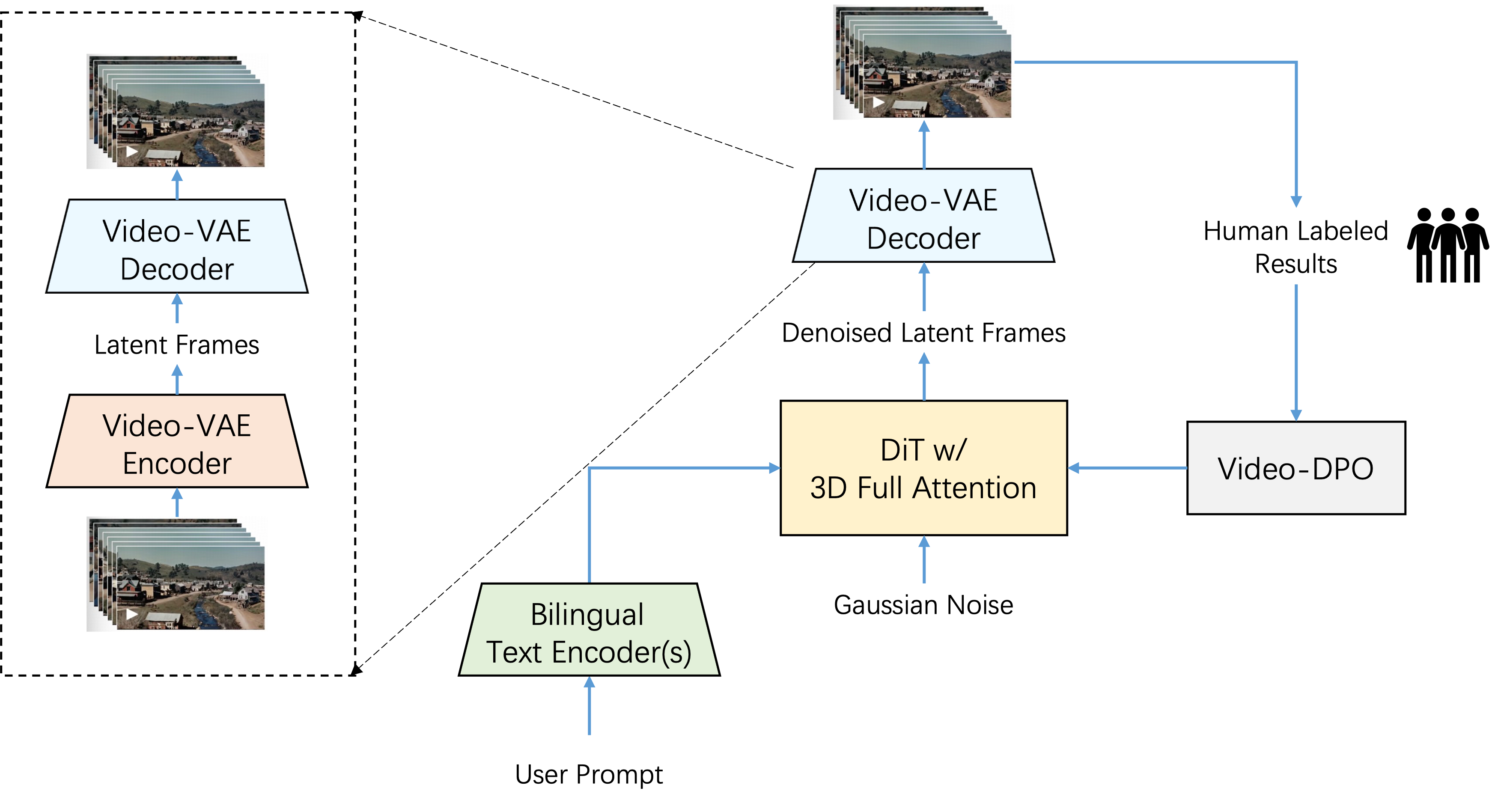
(官方 README 中的模型架构图,出处:assets/model_architecture.png)
六、配置文件全部参数解释
官方 4.4 节 "Best-of-Practice" 给出的推理参数最佳实践:
| 模型 | infer_steps | cfg_scale | time_shift | num_frames |
|---|---|---|---|---|
| Step-Video-T2V | 30-50 | 9.0 | 13.0 | 204 |
| Step-Video-T2V-Turbo | 10-15 | 5.0 | 17.0 | 204 |
| 参数 | 作用 | 来源 |
|---|---|---|
--infer_steps |
扩散采样步数 | README 4.4 |
--cfg_scale |
CFG 引导强度 | 同上 |
--time_shift |
时间位移调度 | 同上 |
--num_frames |
生成帧数 | 同上 |
--tp_degree |
张量并行度 | README 4.3 |
--ulysses_degree |
Ulysses 序列并行度 | 同上 |
七、启动、后台常驻与开机自启
7.1 启动
按第五节 5.3 执行 torchrun ... run_parallel.py,跑完即输出视频。官方未提供常驻服务,本文不展开 systemd。
7.2 修改端口
多卡方案中 caption/VAE 服务 URL 由 call_remote_server.py 返回,用 --vae_url / --caption_url 指定。
八、功能实操教程
第 1 步:装好环境(5.1),下载权重到 model_dir(5.2)。
第 2 步:在 4 卡机器上后台起 call_remote_server.py,记下返回的两个 URL。
第 3 步:跑官方示例 prompt(5.3 命令),观察终端打印采样进度。
第 4 步:换自己的提示词,比如 "一只猫在窗台晒太阳,镜头缓缓推进",--infer_steps 50 --cfg_scale 9.0 --time_shift 13.0。
第 5 步:想加速,换 Turbo 权重,把 --infer_steps 设 12、--cfg_scale 5.0、--time_shift 17.0(官方 4.4 表)。
第 6 步:只有单卡?走 DiffSynth-Studio 的 stepvideo 示例做量化低显存推理。
九、全套报错故障排查
-
CUDA out of memory原因:768×768×204 要 78.55GB。 解决:用更小分辨率(544×992×136 要 72.48GB);或走 DiffSynth-Studio 单卡量化;Turbo 版步数更少。 -
text encoder 报算力不支持 原因:step_llm 只支持 sm_80/86/90(A100/30/40/H100)。 解决:换支持的显卡;老卡(V100 sm_70)官方未支持。
-
flash-attn编译失败 原因:编译耗时长或环境不齐。 解决:官方注明 flash-attn 可选,跳过即可(推理慢些)。 -
torchrun 报
tp_degree x ulysses_degree != parallel原因:并行度乘积不等于 nproc_per_node。 解决:确保tp_degree × ulysses_degree = parallel(官方注释原文)。 -
HF 下载慢 原因:网络。 解决:改用 ModelScope 权重(官方表格提供)。
十、升级、回滚与卸载
- 升级:
git pull;按官方 News(2025.03.17 发布 TI2V、2025.02.17 发布 T2V)切换对应权重。 - 回滚:
git checkout <旧tag>;权重多版本分目录。 - 卸载:删除仓库、
conda env remove -n stepvideo。
十一、商用许可与合规风险提示
- 代码为 MIT,允许商用、修改、分发。
- 模型权重需到 HuggingFace/ModelScope 模型页确认其许可证(与代码 MIT 可能分离),商用前单独核对。
- 生成视频需符合内容规范,不得用于伪造真人、虚假宣传。
参考链接
- 官方 README:https://github.com/stepfun-ai/Step-Video-T2V/blob/main/README.md
- 论文:https://arxiv.org/abs/2502.10248
- 权重(HF):https://huggingface.co/stepfun-ai/stepvideo-t2v
- 单卡方案:https://github.com/modelscope/DiffSynth-Studio/tree/main/examples/stepvideo